The map
How to read the world map, the price and balance cards, routes, ports and tankers, and what each tap opens.
On this page
The Map is the first tab and the screen the game opens on. It shows your flag's routes and tankers on a real world map, with your grade's price and your balance on top. This page explains what you see and what each tap does.
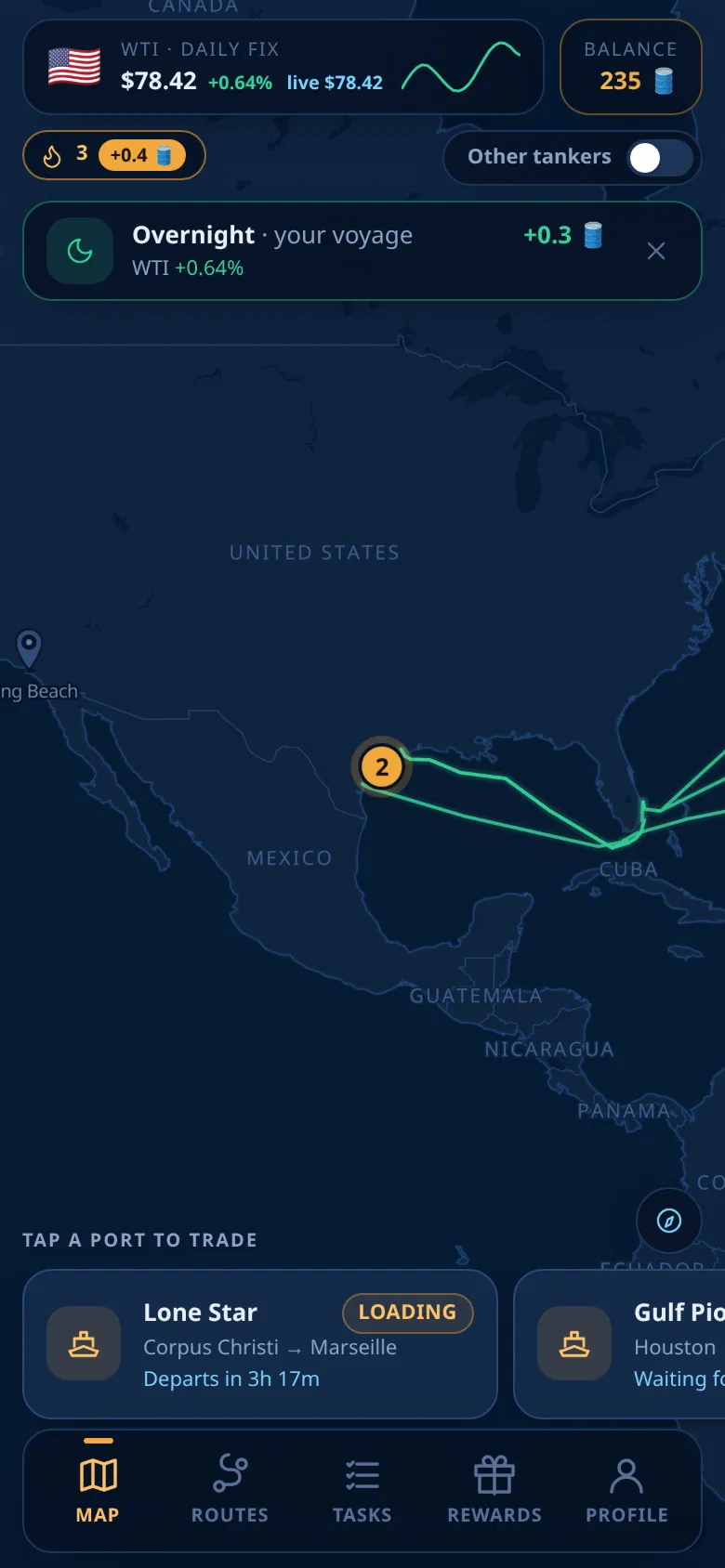
On the map
When the app opens, the map shows the whole world and then flies to a loading port of your flag.
The cards at the top
- The price card, the larger card at the top: your flag, Daily fix of your grade, the latest fix in US dollars, its change from the fix before, a live value and a small chart. The live value is decoration and never pays. See Prices and daily fixes.
- Balance, the card next to it: your wBarrel balance in 🛢️.
Under them:
- your daily streak chip (see Daily streak);
- the switch Other tankers;
- on weekends, the note that exchanges are closed (see Weekends);
- the card Overnight, when today's fix moved the expected payout of your shares at sea.
Routes and tankers
- Your routes are solid green lines. Your tankers are amber ships with a green band.
- A tanker at sea moves along its route line at an even pace, from its departure time to its arrival time.
- The ship's size shows the route's length: a small tanker for short routes, a large one for the longest.
- Locked tankers and routes are not drawn. You find them in Routes and positions.
With Other tankers on, the routes of the other flags appear as thin dashed blue lines and their tankers as blue ships. The switch is off at first, and your phone remembers your choice.
Ports
Every port has a pin with its name:
| Pin | Meaning |
|---|---|
| Amber, with an oil drop | A loading port of your flag |
| Light blue | A destination of your routes |
| Dim blue | Any other port |
A bubble on a pin counts the tankers the map shows in that port right now. An amber bubble means one of your tankers is in port or loading there: you can buy a share on it. When you zoom out, nearby ports merge into one circle with the total; tap it to zoom in.
When you zoom in, the tankers in a port are drawn around the pin, each with a small sign:
| Sign | State |
|---|---|
| Oil drop | In port or Loading |
| Clock | In queue |
| Pause | Parked |
| Arrow up | Unloading or Awaiting fix |
Your own tankers that are In port or Loading, the ones you can buy on, pulse with an amber ring. The port names written on the map are in English; the sheets use your language.
What a tap opens
| You tap | What opens |
|---|---|
| A tanker | Its tanker sheet. See Buying a share |
| A circle of ports | The map zooms in |
| A port pin | The port sheet |
| A route line | The route card |
| Open water | The route card closes |
Several routes can share the same sea lane. Tap the same spot again to move to the next route.
The port sheet
It shows the country, the port's name, and Benchmark with its latest fix. Below is every tanker whose route starts or ends at this port, whatever it is doing now:
- Loading here: the route starts here.
- Bound here: the route ends here.
These two labels describe the route, not where the ship is right now; the status chip tells you that. Tankers of other flags are listed dimmed. Tap a tanker to open its sheet.
The route card
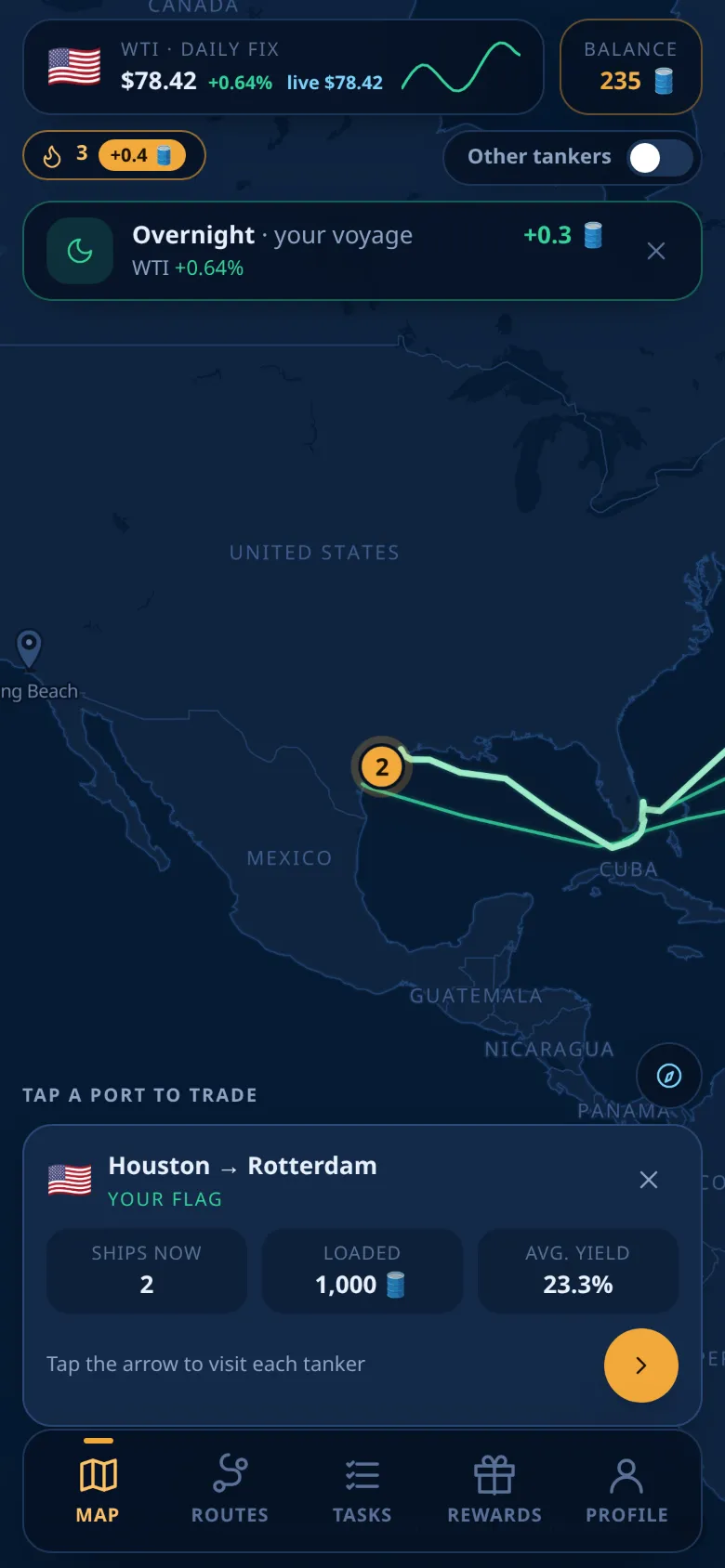
The route card shows the flag, the route, and Your flag or the country of the route. It has three numbers:
| Number | Meaning |
|---|---|
| Ships now | Tankers on this route right now, in port, at sea or at the destination |
| Loaded | Their cargo added up, in 🛢️ |
| Avg. yield | The average base yield of their voyages, without the market move |
The amber arrow (Next tanker on this route) flies to each tanker of the route in turn and shows its name, status and countdown. Tap that row to open the tanker's sheet.
The dock
Above the tab bar, Tap a port to trade leads a row of cards, one for each of your tankers in port or loading. Scroll it sideways. Tap a card to fly to its port and open its sheet.
Controls
- Move: drag with one finger.
- Zoom: pinch with two fingers.
- Turn and tilt: turn or slide with two fingers.
- Recenter: the compass button just above the row of tankers goes back to the whole-world view.
Ships rock and leave a wake when you zoom in. With "reduce motion" on, or on slower phones, they still move along their routes but without the animation.
How fresh it is
While the app is open, the map reads the fleet about once a minute and the prices about every two minutes. Countdowns update every few seconds. Nothing updates while the app is minimised; it catches up when you come back.
Ready to sail?
Open Oil Voyage in Telegram and load your first tanker.