Routes and positions
The Routes screen, every tanker of your flag in port, at sea and locked, and My positions, the list of every share you hold.
On this page
The Routes tab lists every tanker under your flag and every share you hold. It has two tabs: Routes for the fleet and My positions for your shares. This page explains both, and lists all the routes of the game.
Routes
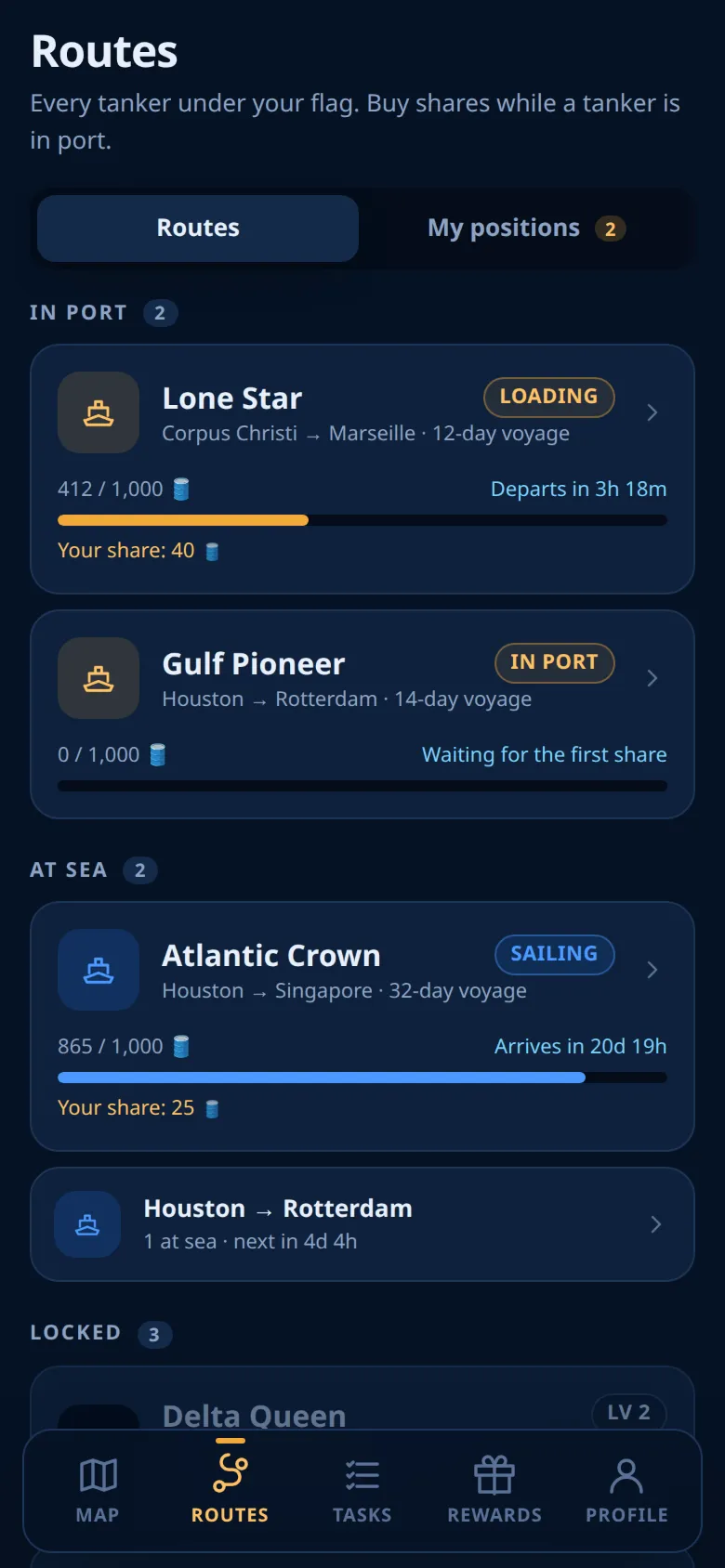
The screen's subtitle sums it up: Every tanker under your flag. Buy shares while a tanker is in port. On weekends, the weekend note follows. The fleet is split into up to three parts.
In port
In port lists your flag's tankers that are In port or Loading. Every open route has exactly one, so you normally see one card per open route. These are the tankers you can buy on. Tap a card to open the tanker sheet. See Buying a share.
A tanker card shows:
- the tanker's name and its status chip;
- the route and its number of days;
- the cargo loaded and the capacity, with a fill bar;
- the countdown, for example Departs in and the time left;
- Your share when you have cargo on board.
At sea
At sea lists your flag's tankers that have left their loading port: sailing, parked, queued, unloading or waiting for a price.
- Tankers that carry your share appear as full cards.
- The others are folded into one row per route, with the number of tankers and the time until the next arrival. Tap the row to unfold it, then tap a name to open that tanker's sheet.
You cannot buy on these tankers. Their sheets show where they are and when they arrive.
Locked
Locked appears only while your flag has tankers that the world has not opened yet. Each one shows its level badge and the line "Unlocks at world level" with the level. "World level" here means the Population level. Under the list: The world levels up as more captains join. Invite friends to open new tankers. See World progress.
Turns in port
When the tanker in port departs, the next tanker of that route takes its place at once. A tanker that has finished its voyage rests and later comes back to its loading port when its turn comes; there is no return trip. If all tankers of a route are busy, a sister ship is added. It carries the name of the route's first tanker with a number: II, III and so on.
All routes
This table is live. It lists every route of the game with its days at sea, its daily rate, its base yield for the whole voyage and the benchmark that prices its payout. Routes that open at a later world level are marked.
Right now 21 of the 21 routes are open, from 3 days to 36 days at sea.
Your positions
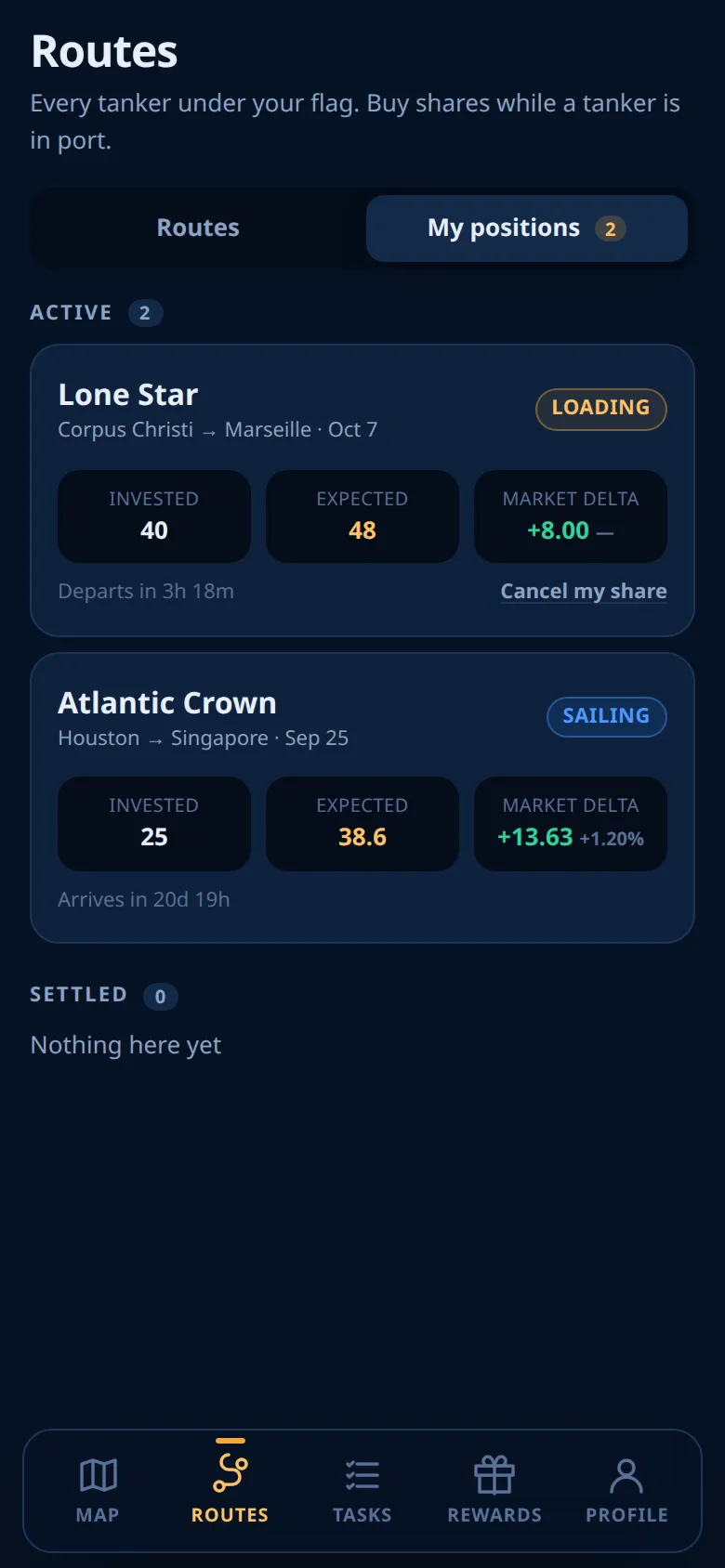
My positions lists your shares, newest first, in two lists:
- Active: shares on tankers that have not settled yet.
- Settled: shares that were paid out or cancelled.
The tab shows how many active shares you have. It lists the shares of every flag, including shares you bought under a flag you flew before. The same list is in Profile → History → Positions.
A position row
Each row shows the tanker's name (with the tag Free for your free share), the route, the date you bought, and a status chip. Then three cells:
| Cell | Meaning |
|---|---|
| Invested | The amount you put in |
| Expected | What the share is expected to pay. After settlement this cell becomes Paid |
| Market delta | Your gain in 🛢️ so far, base yield included, and the move of the destination benchmark in % |
An active row also shows what the tanker is doing (for example Arrives in and the time left), the note for a parked tanker, and the link Cancel my share while the share can still be cancelled. See Cancelling a share.
A cancelled share shows Cancelled and the cells Invested, Returned and Fee.
How the expected payout changes
- Before the tanker sails: your amount plus the base yield. The market move is not in it, so the % in Market delta shows a dash.
- After it sails: a live estimate. It uses the latest daily fix of the destination benchmark against the fix of the departure day, and it never goes below the floor. It changes when a new daily fix arrives, not every minute.
- For a parked tanker: it already uses Friday's fix, so it is normally the payout you will get.
The final payout uses the fix of the arrival day, so it can differ a little from the last estimate. How it is calculated: The payout.
Keeping the list up to date
My positions reloads when you open the app, when you come back to it, and after you buy, cancel, change your flag or close the payout screen. It does not reload by itself while you stay on the screen. If a row looks old, for example a countdown at 0m, switch to another app and come back.
Ready to sail?
Open Oil Voyage in Telegram and load your first tanker.