wDOGE and DOGE
wDOGE is the second currency, earned with tasks. How to exchange it into whole DOGE, and how DOGE is withdrawn on BNB Smart Chain (BEP-20).
wDOGE is the second currency of Oil Voyage. You earn it with tasks. You can exchange it into DOGE inside the game, and then withdraw the DOGE to your own wallet. This page explains each step.
wDOGE
- Rate: 1 DOGE = 1,000,000 wDOGE. The rate is fixed.
- Always whole: wDOGE is always a whole number.
- Where you see it: in Profile, and in Tasks with its value in dollars and an Exchange button.
Where it comes from
- Task rewards. Each reward tier of a task is worth an amount in US dollars. When you claim it, the dollars are converted into wDOGE at the DOGE price of that moment. Right now 1 DOGE is counted at $0.08. See Tasks.
- Your friends' tasks. When a captain you invited claims a task reward, you can get 10% of it on top. See Referrals.
wDOGE is not wBarrel. A deposit never buys wDOGE, wDOGE cannot be turned into wBarrel, and it cannot be withdrawn as wDOGE. To take it out, exchange it into DOGE first.
The exchange
Open wDOGE → DOGE from the card in Profile, or tap Exchange in Tasks.
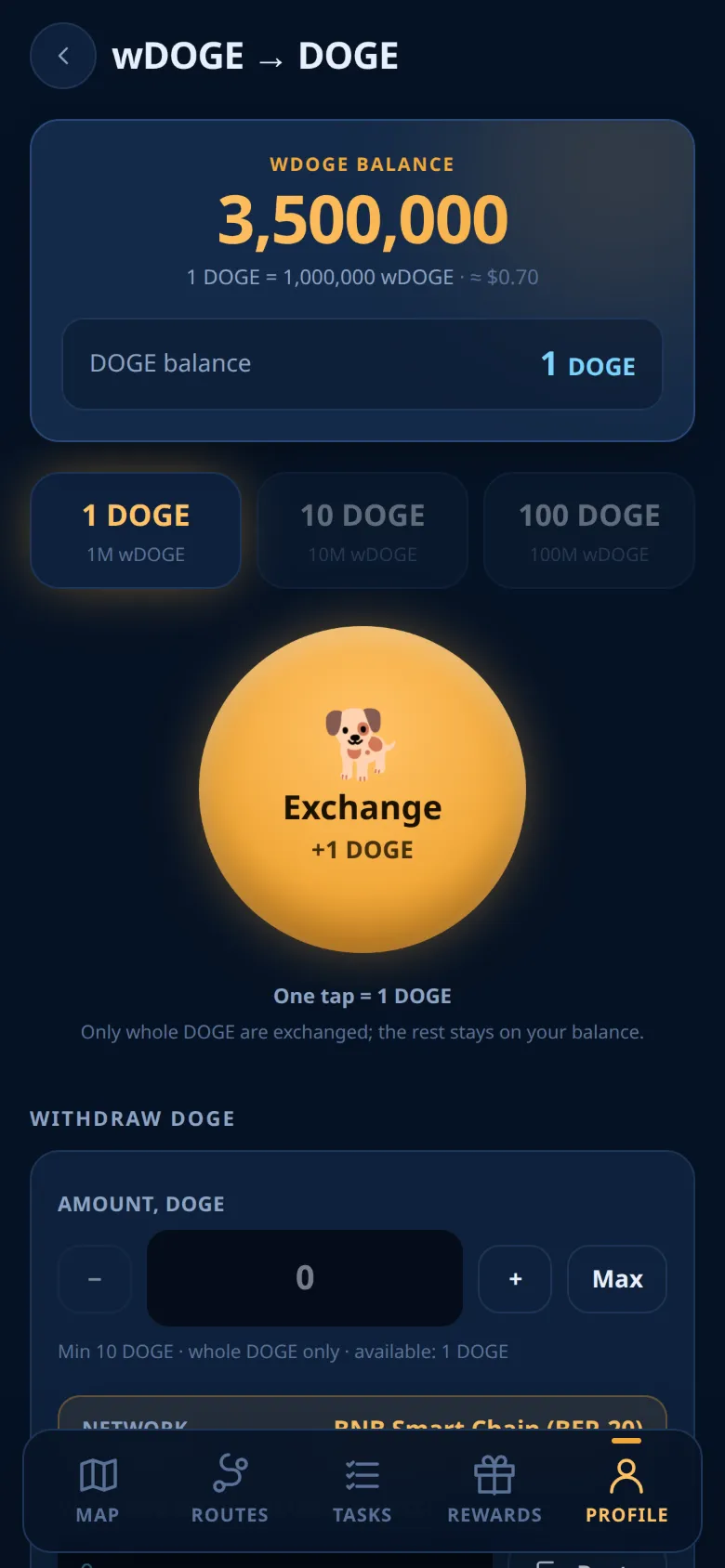
- Pick a step. The steps are 1, 5, 10, and 100 DOGE per tap.
- Tap the big exchange button. Each tap exchanges that many DOGE.
- Tap again as often as your wDOGE balance allows. Steps you cannot pay for are grey.
- The exchange is instant and free.
- It needs no two-factor code and no operator, and it works on weekends.
- Only whole DOGE are exchanged; the rest stays on your balance.
- DOGE cannot be exchanged back into wDOGE.
If the screen says the exchange is paused, your wDOGE stay on your balance until it opens again.
The exchange opens once per account. It opens when your own deposits reach $10, or when the deposits of the friends you invited reach $10 in total. The two are not added together. Once open, it stays open for good. This protects task rewards from bot farms. Until then, the screen shows the condition and your progress.
Withdrawing DOGE
DOGE leaves the game only through a withdrawal, on the regular withdrawal page: Profile → Withdraw. There, choose BNB Smart Chain as the network and DOGE as the currency. The wDOGE → DOGE screen keeps the exchange, and under Withdraw DOGE its Go to withdrawal button opens the withdrawal page.
DOGE is paid on BNB Smart Chain (BEP-20), not on the Dogecoin network.
Caution
BNB Smart Chain (BEP-20) only. Use an address that accepts DOGE on BNB Chain: coins sent to another network or a wrong address are lost. Your address must start with 0x. An address of the Dogecoin network (starting with D) is refused. A transfer to a wrong address cannot be reversed.
Before you start, the same rules apply as for wBarrel withdrawals: your account must be active, no new request is accepted from Saturday 00:00 UTC to Monday 00:00 UTC, and if two-factor protection is on, every request asks for its code. Depending on the game's setting, you withdraw in the Mini App, in the bot (/withdraw), or in either. See Withdrawals.
DOGE withdrawals have their own switch, separate from wBarrel withdrawals. While it is off, the screen says "DOGE withdrawals are paused right now. Your DOGE stay on your balance."
On the withdrawal page, after you choose BNB Smart Chain and DOGE:
- Enter a whole number of DOGE, at least 100 DOGE.
- Paste your BNB Smart Chain address.
- Check the fee and what you receive, then tap Review.
- If two-factor protection is on, enter the code from your authenticator app (or a recovery code). Confirm.
You can withdraw at most $20 worth of DOGE in any 48 hours, at the DOGE price of each request. Pending, approved and sent requests count; cancelled and rejected ones do not.
Fees
The fee is kept from the amount you request. The rest arrives in whole DOGE.
- Network fee: 0 DOGE per request.
- Service fee: 0% of the amount, but at least $1, paid in DOGE at the market price of the moment and rounded up to whole DOGE.
The current fees are also in the withdrawal table.
Warning
On a small withdrawal the minimum service fee can be a large part of the amount. Always check "You receive" before you confirm. The minimum service fee needs a current DOGE price. If there is none, the request is refused: try again in a few minutes.
After the request
- The whole requested amount leaves your DOGE balance at once and is held.
- An operator reviews the request. The statuses are the same as for wBarrel: see Withdrawals.
- While the request is "Pending review", you can cancel it on the withdrawal page. The whole held amount returns to your DOGE balance.
- Once the DOGE is sent, the row shows View on BscScan.
- The bot messages you when the status changes.
DOGE requests have no 24-hour limit, and they do not count toward the wBarrel limit. They are listed on the withdrawal page under DOGE withdrawals, not in Profile → History.
Good to know
Note
wDOGE is an in-game unit, not legal tender. There is no guaranteed income, and you can lose part or all of what you put in. Nothing here is financial advice. The exchange and withdrawals are offered at the operators' discretion and may be changed, paused or withdrawn. See the Terms.
Ready to sail?
Open Oil Voyage in Telegram and load your first tanker.