Buying a share
How to put wBarrel into a tanker of your flag, what the tanker sheet shows before you buy, and what each refusal message means.
On this page
A share is your part of a tanker's cargo on one voyage. You buy it with wBarrel (🛢️) while the tanker is in port or loading. This page shows where to buy, what to check first and what the messages mean.
Where to buy
You buy in the tanker sheet. You can open it in several ways:
- On the Map, tap one of your tankers, or a card in the row Tap a port to trade above the tab bar.
- On the map, tap a port and then a tanker in the port's list.
- In Routes, tap a card under In port.
You can buy only on a tanker of your own flag that is In port or Loading. Every open route of your flag always has one such tanker, on weekends too.
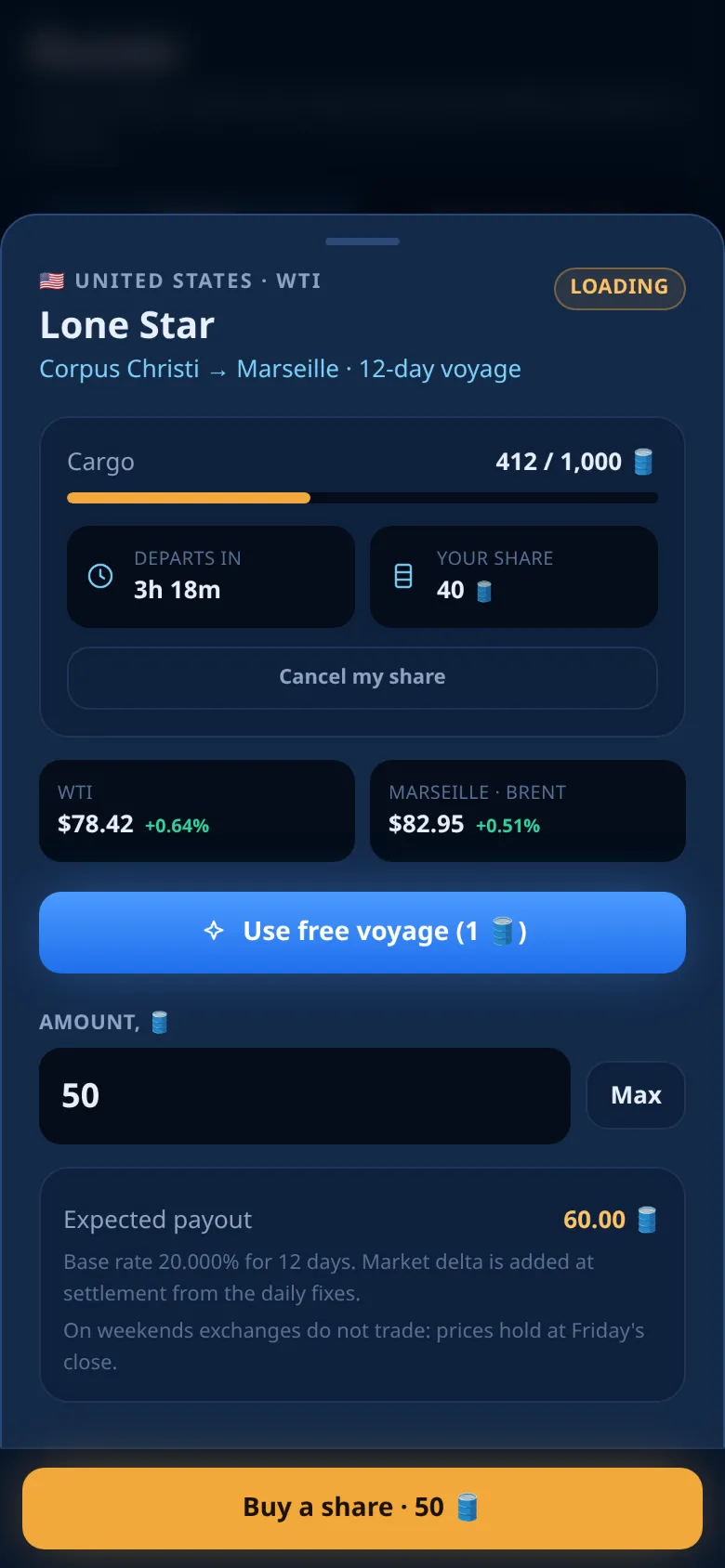
How to buy
- Open the sheet of a tanker in port.
- Type an amount in Load into the tanker, or tap Max.
- Check Expected on arrival (see below).
- Tap the main button Buy a share. It shows the amount you entered.
- A short message confirms the share, and the sheet closes.
The amount leaves your balance at once. Your history shows the line Share bought. If this share is the first one on an empty tanker, it starts the loading timer: the tanker departs 6 hours later, or earlier if it fills up. See The voyage cycle.
Before you buy
The sheet shows:
| Part of the sheet | What it tells you |
|---|---|
| The header | Flag, country and grade, the tanker's name, the route and its number of days, the status chip |
| Cargo | How much is loaded and the tanker's capacity, with a fill bar |
| The timer | Loading time for an empty tanker, Departs in for a loading one |
| Your share | The sum of your shares on this voyage |
| Two price chips | Left: your grade. Right: the destination port and its benchmark |
| Expected on arrival | Your amount plus the base yield for the whole voyage |
Read the expected payout carefully:
- The note under it says "Base rate" with a percentage and a number of days. That percentage is for the whole voyage, not for one day. It is the route's daily rate times its days; longer routes have a higher daily rate.
- The market move is not included. It is added at settlement from the daily fixes of the destination benchmark, and it can be positive or negative. See The payout.
- The sheet always adds: On weekends exchanges do not trade: prices hold at Friday's close.
Amounts and limits
- The smallest share is 1 🛢️. Amounts go in steps of 1 🛢️; with a step of 1 🛢️, only whole numbers are accepted and the field takes no decimal point.
- The room on the tanker. A tanker carries at most its capacity, shared by all captains who load it. Right now a new voyage loads up to 5,000 🛢️. The capacity is fixed at the first share; a loading tanker keeps it.
- Your balance. You can use your whole balance. Above it, the sheet shows Not enough 🛢️.
- Max fills in the smaller of the room left and your balance, rounded down to whole 🛢️.
- A limit per captain. The game can set a limit for one captain on one voyage. The app does not show it in advance; if you reach it, you see You have reached the limit for one captain on this voyage.
You can buy several shares on the same tanker. Each one gets its own row in My positions, and the sheet adds them up under Your share. All shares of one voyage are paid on the same terms.
The free voyage
A new player gets one free share of 1 🛢️, paid by the game. While it is available, the sheet of a tanker in port shows a button Use free voyage with the amount. Tap it to put the free share on that tanker. Your balance does not change.
- It follows the same rules as a paid share: your flag, a tanker in port or loading, room on the tanker.
- It can be used once. It cannot be cancelled.
- It pays out like any other share. The whole payout goes to your balance.
If the purchase is refused
| Message | What to do |
|---|---|
| Not enough 🛢️ | Lower the amount or make a deposit |
| There is not that much room left on this tanker. Lower the amount. | Another captain filled part of the tanker. Lower the amount |
| You have reached the limit for one captain on this voyage. | You reached the limit for this voyage. Use another tanker |
| Foreign flag — you can only load your own country's tankers. | Open a tanker of your own flag |
| This tanker has sailed. The next one on this route is already in port. | The tanker left. Buy on the next one in port |
| The free voyage is no longer available. | Your free share was already used. Buy a paid share |
| Pick a flag to continue | Choose a flag first |
| The previous attempt did not go through. Try again. | Tap the button again |
| Too many attempts. Wait a minute and try again. | Wait a moment and try again |
| No connection. Check your internet and try again. | Check your connection and try again |
After a refusal, the sheet reloads the tanker so you see the real room and status.
Tip
If the connection drops while you buy, simply try again. The app sends the same request, so a retry never buys the same share twice.
After your first share
After your very first purchase, the app asks once if the bot may message you, for example when a voyage pays out. Then it offers a shortcut on your home screen. Both are optional. See Notifications and the bot.
Changed your mind? While the tanker is still loading, you can cancel a share for a fee.
Ready to sail?
Open Oil Voyage in Telegram and load your first tanker.