Flags and countries
The flags of Oil Voyage, their crude grades, ports and routes, how to choose a flag and how to change it later.
On this page
You sail under one country's flag. The flag decides which tankers you can load, which routes they sail and which crude grade you see on the map. This page lists the flags and explains how to choose one and how to change it.
What a flag decides
Your flag sets three things:
- Your tankers. You can buy shares only on tankers of your current flag. You can open and look at any other tanker, but its sheet says Foreign flag — you can only load your own country's tankers.
- Your routes. Every flag has its own loading ports and its own routes to destination ports.
- Your grade. Every flag ships one crude grade. Its daily price is shown on the map and on the left price chip of a tanker sheet.
Important
Your grade's price is shown for information. The market part of a payout comes from the benchmark of the destination port (Brent, Dubai or WTI), not from your grade. See The payout and Prices and daily fixes.
The flags
There are 6 flags in the game. 6 of them are open at the current world level. The table below is live: it shows every flag, its grade, its open routes, how long its voyages last, the base yield of those voyages and whether the flag is open.
Grade names stay in Latin script in every language: WTI, Urals, Dubai, Basrah Medium, Azeri Light, WCS.
Loading ports
Every tanker of a flag loads at one of that flag's ports.
| Flag | Grade | Loading ports |
|---|---|---|
| 🇺🇸 United States | WTI | Houston, Corpus Christi |
| 🇷🇺 Russia | Urals | Primorsk (Baltic Sea), Novorossiysk (Black Sea) |
| 🇦🇪 UAE | Dubai | Fujairah |
| 🇮🇶 Iraq | Basrah Medium | Basrah |
| 🇦🇿 Azerbaijan | Azeri Light | Ceyhan (in Türkiye) |
| 🇨🇦 Canada | WCS | Vancouver |
Canada is the flag that opens later. Until the world reaches its level, Canada stays in the flag list, dimmed, with a lock and the level it needs. How the world levels up: World progress. Every route, with its days and its benchmark: Routes and positions.
Choosing your flag
You choose your flag during the welcome registration, at step 3 of 4: Choose your flag.
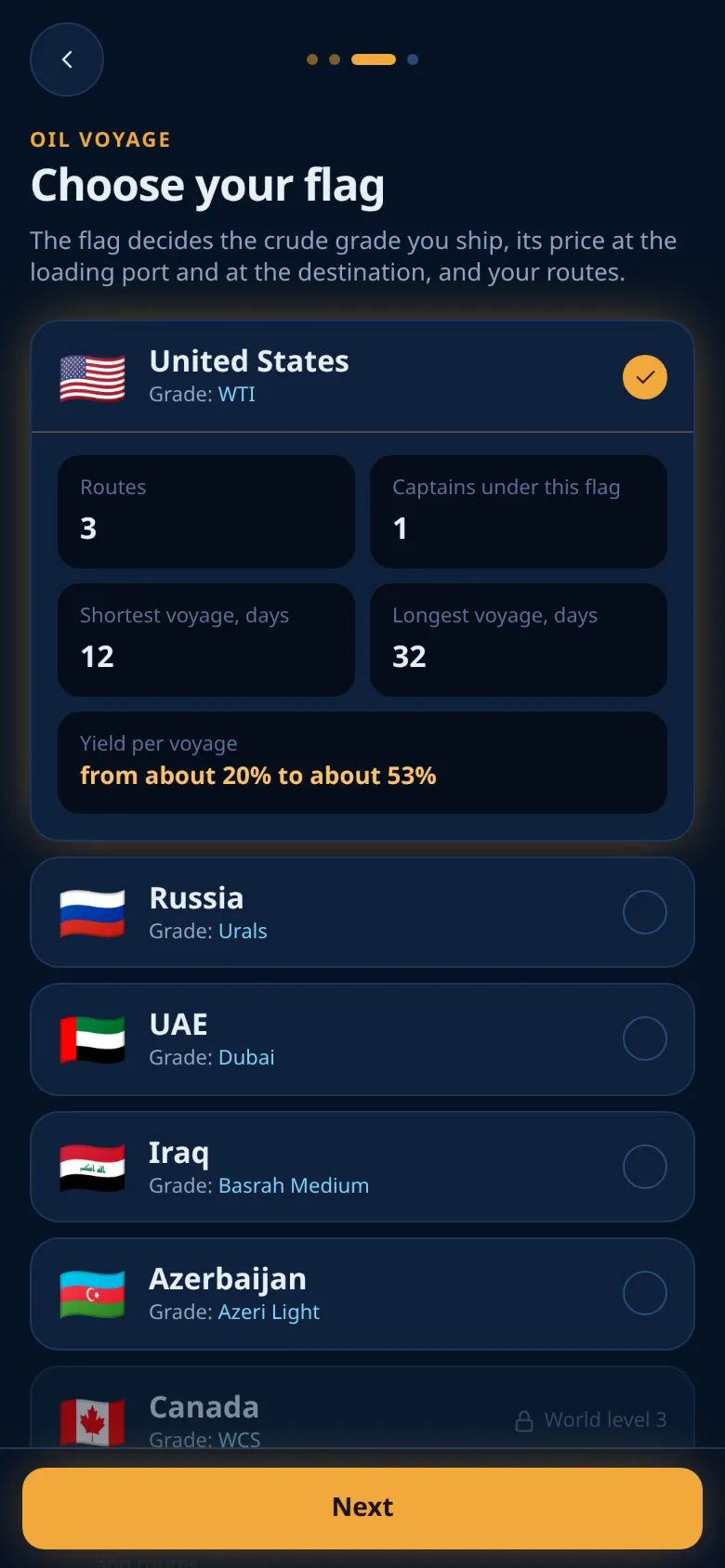
- Tap a flag in the list. Each row shows the flag, the country and its grade.
- Read the numbers under the selected flag (see below).
- Tap Next. Until you pick a flag, the screen says Pick a flag to continue.
- Finish the last step (take the tour or skip it). Your flag is saved at this moment, together with your language and your consents.
The numbers in the flag picker
The numbers appear only under the flag you selected:
| Label | What it means |
|---|---|
| Routes | The flag's routes that are open at the current world level |
| Captains under this flag | Players who finished the registration and fly this flag right now |
| Shortest voyage, days | The shortest open route of the flag |
| Longest voyage, days | The longest open route of the flag |
| Yield per voyage | The base yield of the shortest and the longest voyage, rounded |
The yield in the picker is the base yield only: the route's daily rate times the days at sea. The daily rate grows with the route length, from 1% a day on the shortest routes to 1.6% a day on routes of 40 days or more. The market move is not in it, and the market move can be negative. See The payout.
Changing your flag
You can change your flag at any time. It is free and there is no waiting time.
- Open Profile and tap Flag.
- The sheet Change flag shows the same flag picker.
- Pick a different open flag. The main button changes from Change flag to "Sail under" and the flag's name.
- Tap it. A short message confirms your new flag.
What changes and what stays:
- Shares you already bought stay. They keep sailing and are paid out as usual. The sheet says it too: Shares you already bought stay where they are. Only the fleet on your screens changes.
- My positions keeps listing the shares of every flag, old ones included. You can still cancel a share on your old flag's tanker from there while that tanker is loading. See Cancelling a share.
- The Map and Routes screens now show the new flag's tankers, and the price card on the map shows the new grade.
- New shares can only go on the new flag's tankers.
Locked flags
A flag that the world has not opened yet cannot be selected: its row is disabled. If an old screen still sends the choice, the app shows This flag is not open yet. Go back and pick another one. The flag becomes selectable once the world reaches its level. Open the flag sheet again to see it.
Ready to sail?
Open Oil Voyage in Telegram and load your first tanker.