Notifications and the bot
What the Oil Voyage bot messages you about, how to choose it, which messages always arrive, and the bot's commands and menu buttons.
On this page
The game's Telegram bot, @OilVoyageBot, opens the game and can message you about your voyages, rewards and money. This page explains when the bot can write to you, what it sends, how to choose, and what its commands and buttons do.
When the bot can message you
Telegram lets a bot write to you only after you allowed it. The bot can message you after one of these:
- you pressed Start in the chat with @OilVoyageBot;
- you tapped Notify me in the game and allowed it in Telegram's prompt. The game offers this once, right after your first share.
If you only ever opened the game and never did one of these, you get no messages.
If you block the bot, all messages stop, including messages about withdrawals. Unblock it or press Start again to get them back.
Game messages also need a finished registration and an active account.
What the bot sends
There are six kinds. Each has its own switch.
| Kind | What you get |
|---|---|
| Voyages | A tanker with your share departs, unloads (with your payout), or is parked for the weekend. A daily summary at 00:20 UTC when the new price moved your cargo at sea. |
| Tasks and rewards | A task reward is ready to claim. A partner level is reached. A keep-it task is complete. The evening streak reminder. |
| Invitations | Your share of an invited captain's deposit. Your share of a friend's task reward in wDOGE. |
| Deposits | A deposit is credited to your balance. |
| Staking | A staking unlock is paid out. |
| News and events | Announcements, events and new world levels. |
Every message has a button that opens the game, and the text is in your game language.
What always arrives
Messages about your withdrawals arrive even when every switch is off: requested, cancelled, approved, sent, completed, rejected (with the reason) or failed. They need only that the bot can message you. See Withdrawals.
What the bot does not send
There is no message for the welcome bonus, for buying or cancelling a share, for claiming a task, for an exchange of wDOGE, for daily staking interest, or for a deposit that is not credited yet. There is also no message when a friend joins, unless their registration lets one of your referral tasks reach a new tier.
Choosing your notifications
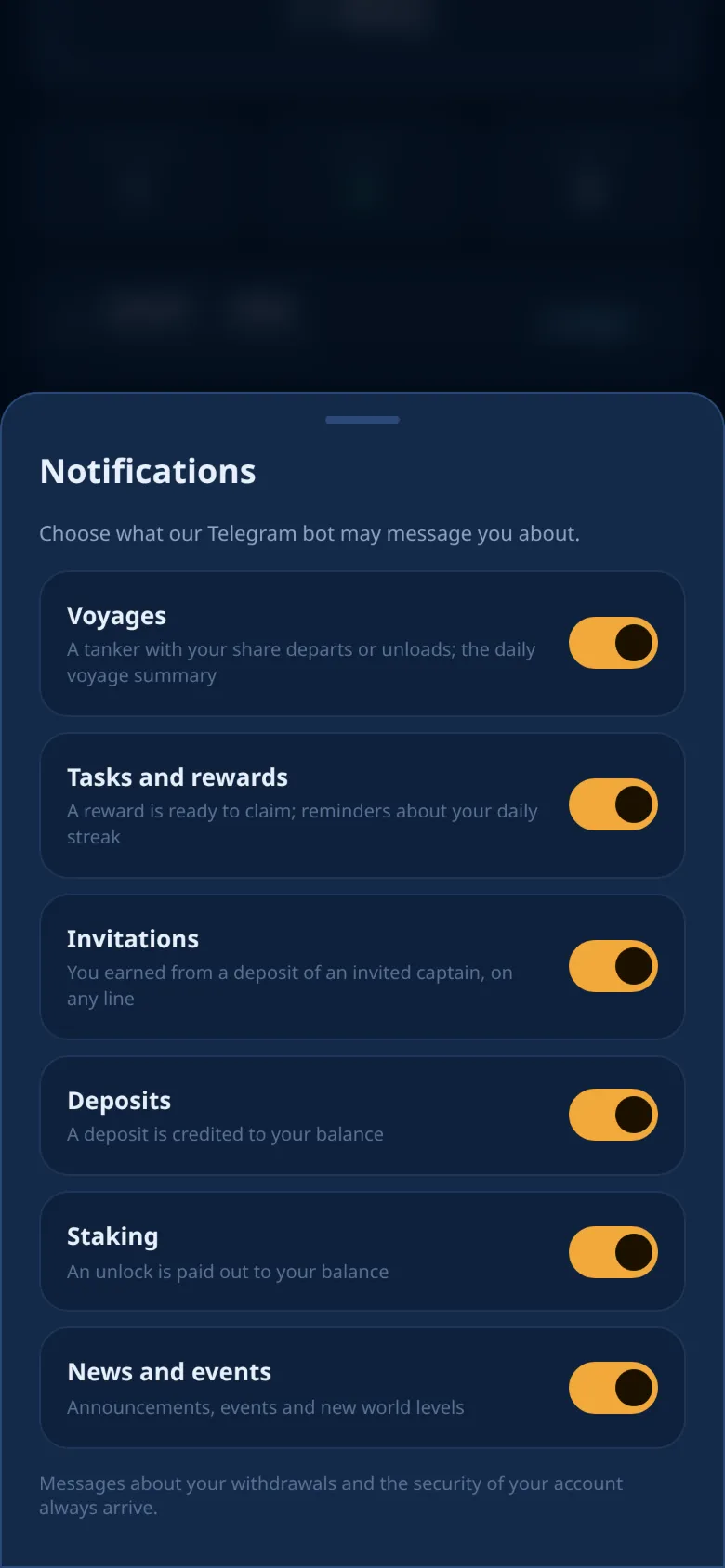
- Open Profile → Notifications.
- Turn each kind on or off. The change is saved at once.
All six kinds are on at first. The badge in Profile shows how many are on, for example 6/6. The choice is saved on your account, so it is the same on every device.
Commands
In the chat with the bot, the / menu has three commands:
| Command | What it does |
|---|---|
| /start | Opens the bot's menu. If you have no game account yet, it also creates one. |
| /help | Shows the same menu. |
| /withdraw | Starts a withdrawal step by step in the chat. See Withdrawals. |
The chat's menu button Play opens the game.
The menu
After /start or /help, the bot sends a short description of the game and your invite link as text you can copy. Below it are buttons:
| Button | What it does |
|---|---|
| ⛴ Open Oil Voyage | Opens the game inside Telegram. |
| 📣 Channel, 💬 Chat | Open the news channel and the community group. Each appears only when it is available. |
| 📖 Guide | Opens this guide in your language. |
| 🎁 Invite friends | Shares your invite link. See Referrals. |
| 📤 Withdraw | Starts a withdrawal in the chat. It appears after your registration while withdrawals in the bot are possible. |
Writing to the bot
- Any other message gets the menu again. The bot does not pass messages to a person. To reach the game team, see Support.
- The bot deletes messages that look like a two-factor code or a recovery code, to keep them private.
- The bot takes about one message per second from you. Faster messages or taps are skipped.
- In groups the bot answers no commands.
Warning
The game team never writes to you first and never asks for your codes, keys or payments. Only trust messages from @OilVoyageBot itself.
Ready to sail?
Open Oil Voyage in Telegram and load your first tanker.